
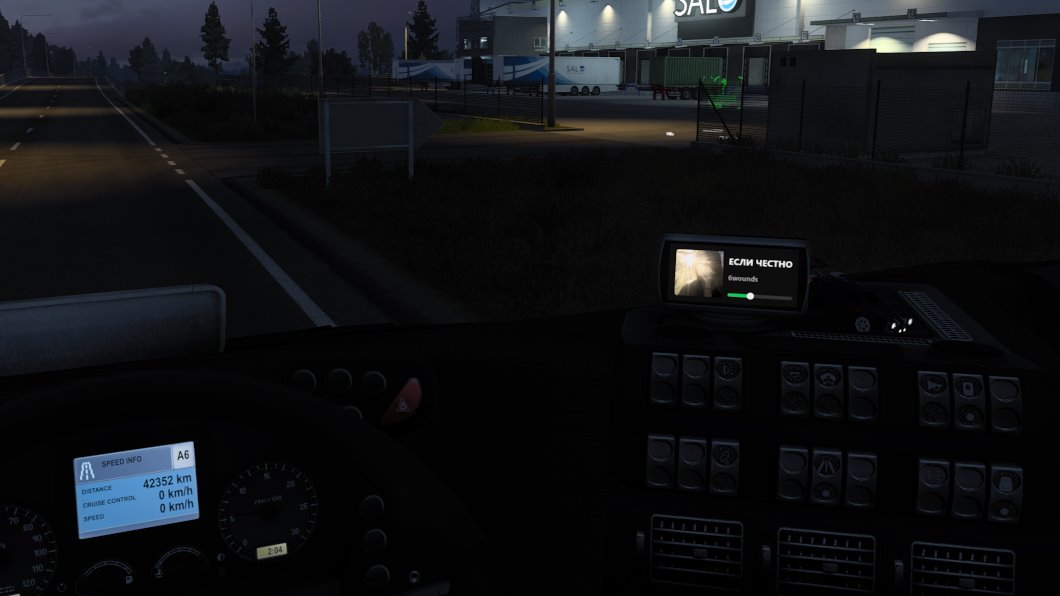
Hello everyone! For the last couple of weeks I've been building a mod for Euro Truck Simulator 2: Spotify right on the truck's built-in navigation screen. Cover art, track title, progress, all on the dashboard. I just like bolting Spotify onto places nobody asked for, last time it was Genius.
A small disclaimer. I'm actually a backend developer and mostly write Go and TypeScript. ETS2 plugins are native DLLs with a C interface, so I wrote this mod in C++, please don't judge too harshly. To keep the code more or less decent I followed the cpp-best-practices guide: building with /W4 /WX plus extra warnings, the MSVC static analyzer and AddressSanitizer in CI, clang-format, unit tests and an offline harness that runs the mod without the game. If an experienced C++ developer spots something odd, I'd be glad to hear about it.
The game's official SDK can only hand out telemetry: speed, pause, which truck you're in. It can't draw anything. So the mod hooks Direct3D 11 and, at the right moment, slips the game its own texture instead of the navigation picture. I'll leave the hooking itself out of this article and talk about the problem that took the most time: how to tell which of the game's textures is the navigation screen. No game sources, no debug info, only what you can see from the outside.
A Screen Is Just a Texture
The game doesn't draw the navigation directly onto the model. First it renders the screen picture into a separate texture (a render target), and then puts it on the screen model like any ordinary texture. So if you swap that texture at the moment the game hands it to the shader, the screen shows your picture.
The game hands textures to the shader with PSSetShaderResources, so that's what I hooked. What was left was figuring out which texture to swap. I expected something widescreen, shaped like the screen, say 1024×512. Spoiler: I guessed wrong.
Paint Everything
Since I don't know which texture I need, let the game show me itself. I made a diagnostic mode: every render target the game binds to a shader is replaced with a pink striped placeholder with a big number on it. The number is just the texture's index in my list.
A simple filter decides which textures go into the list:
const bool shape = (td.BindFlags & D3D11_BIND_RENDER_TARGET) &&
                   td.SampleDesc.Count == 1 && td.ArraySize == 1 &&
                   !(td.MiscFlags & D3D11_RESOURCE_MISC_TEXTURECUBE) &&
                   td.Width >= 64 && td.Height >= 64;
I had to add one exception right away: screen-sized buffers and their downscaled copies (½, ¼ and so on down to 1/32, that's how bloom, SSAO and the rest of post-processing work). Replace those too and instead of a frame you get pink mush. Along the way it turned out the game renders the scene not at 1920×1080 but at 2880×2160: I have render scaling on in the settings. So the "screen size" had to come from the largest buffer, not from the window.
Get into the cab, press the key, and here's what you get:
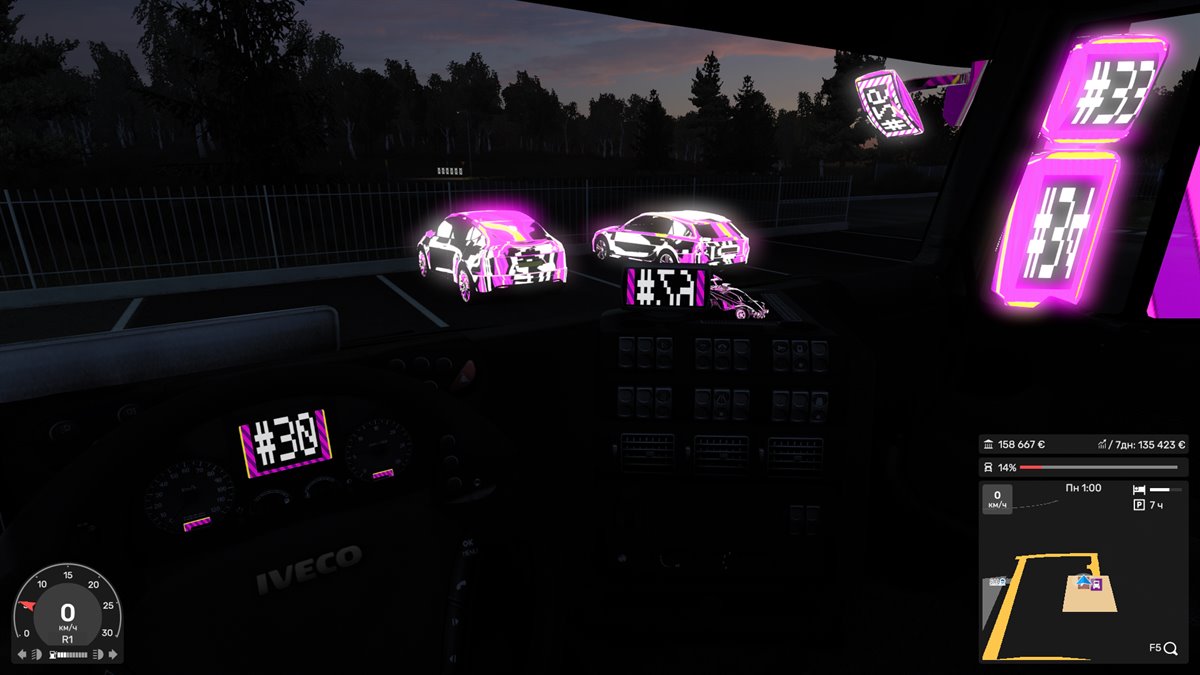
One frame, several findings at once:
#30on the dashboard is the display in the instrument cluster.- The mirrors are textures too (
#33,#34). Makes sense: a mirror reflection is a separate render of the scene from another camera. - Even the cars in the parking lot turned pink, apparently they got reflection textures.
- And the number on the navigation screen is cut off. That's the first hint: the screen shows not the whole texture, only a piece from its middle.
Next comes the "one at a time" mode: only one texture is replaced, I flip through the numbers with keys until the placeholder lands on the navigation screen, then confirm, and the mod writes its description to a file. And here's the surprise: the navigation screen is a square 256×256 texture with the GENERATE_MIPS flag (the game builds its downscaled copies, the mip levels, by itself). No widescreen at all: only a strip in the middle, less than half of the height, ends up on the screen.
The Number Is Different Every Time
Found it, great. Except the number is just the order in which textures caught my eye, and the texture's address changes on every launch and in every truck. I needed a rule, not a number.
First observation: every screen in the cab, both the navigation and the cluster display, is a render target with GENERATE_MIPS no larger than 1024. I haven't seen any other render targets in the game like that. That gave me a definition of a "display":
bool IsDisplay(const D3D11_TEXTURE2D_DESC& d) {
    return (d.MiscFlags & D3D11_RESOURCE_MISC_GENERATE_MIPS) &&
           (d.BindFlags & D3D11_BIND_RENDER_TARGET) && d.ArraySize == 1 && d.Width >= 64 &&
           d.Height >= 64 && std::max(d.Width, d.Height) <= 1024;
}
But there are several displays, and the navigation has to be told apart from the cluster. For that I made a frame capture: for a few frames in a row the mod logs every render target switch and every texture a shader takes. A homemade RenderDoc. In the log the chain is plain to see:
map (1024×1024, no mips, redrawn every frame)
  → display 256×256 → display 256×256          navigation
cluster UI → display 512×512 → display 512×512   instrument cluster
scene: the screen models take the last display of each chain
So the navigation is the display with the map at the start of its chain. And the map is a plain render target without mips. The first version worked exactly like that: every few seconds it looked for displays drawing from a plain render target and took the largest one.
The Speedometer Stole My Player
It all worked right up to the first exit from the pause menu. After the menu the player moved from the navigation screen to the cluster display, right between the speedometer and the tachometer.
It turned out the game mixes one more texture without mips into the displays, apparently a font cache. After the menu the cluster started drawing from it too, and by my rule it began to look "connected to the map". And since it's bigger than the navigation (512 vs 256), it won.
The difference turned out to be simple: the game redraws the map every frame, the font cache it doesn't. So only a render target that was drawn into in the same frame counts as the map.
And a second finding from the same place: display textures come from a shared pool, and the game can hand "my" texture to another display. So the decision is now made again every frame: as soon as something without the map is drawn into my texture, the substitution stops.
The Final Algorithm
Every frame the mod builds a graph of "which display drew from what" and decides like this:
- A display that drew from a plain render target redrawn in the same frame shows the map.
- "Shows the map" flows along the chain: a display that drew from such a display shows the map too.
- Candidates are map displays at the end of a chain, that is, ones no other display draws from.
- The choice is "sticky": the current texture stays as long as it is a candidate. Otherwise the size saved for this truck wins, otherwise the smallest one, since navigation screens are small.
Steps 1 and 2 in code:
for (const auto& [display, sources] : f.plainSources) {
    for (TextureId s : sources) {
        if (f.rendered.count(s)) {  // this render target was drawn into this frame
            a.showsMap.insert(display);
            break;
        }
    }
}

for (bool changed = true; changed;) {
    changed = false;
    for (const auto& [display, sources] : f.displaySources) {
        if (a.showsMap.count(display)) { continue; }
        for (TextureId s : sources) {
            if (a.showsMap.count(s)) {
                a.showsMap.insert(display);
                changed = true;
                break;
            }
        }
    }
}
All of this runs on the render thread, and the game calls PSSetShaderResources thousands of times per frame. So there are no allocations on the hot path, and all the heavy work happens once at the end of the frame. In my measurements the hook adds 4 to 12 nanoseconds per call.
And for older trucks with no navigation screen at all there's a manual choice: in the fitting mode you can flip through the displays and pin the player, for example, to the screen in the instrument cluster.
Conclusion
The main thing I took away from this story: when you don't know how someone else's program works, the easiest way is to make it show itself. Numbering everything turned out to be faster than any guesswork, and the frame capture turned guessing into reading a log. I enjoyed digging into this, and I hope you enjoyed reading about it.
Source code is on GitHub:
👉 ets-spotify